
After students submit their assignments, a teacher’s work has only just begun. It’s not only about reading answers and giving scores, but also handling the many small tasks that quietly consume time: downloading files one by one, opening separate documents to write feedback, matching answers against rubrics, and then re-entering scores into the class grade list.
This process often feels normal because it has been done for so long. But as the number of students and assignments grows, the administrative load quickly piles up and drains teachers’ energy. Time that should be spent supporting students’ learning is instead used for repetitive tasks.
The Grading Students’ Assignments feature in Guru Kreator is designed to streamline this workflow. The goal is simple: help teachers review, assess, and grade student work digitally in one complete flow—without doing the same work twice.
One Workspace, All the Tools You Need
In day-to-day practice, teachers often move between multiple platforms. Assignments are collected in one place, comments are written somewhere else, and grades are stored in separate documents. This fragmented workflow makes grading feel inefficient and disconnected.
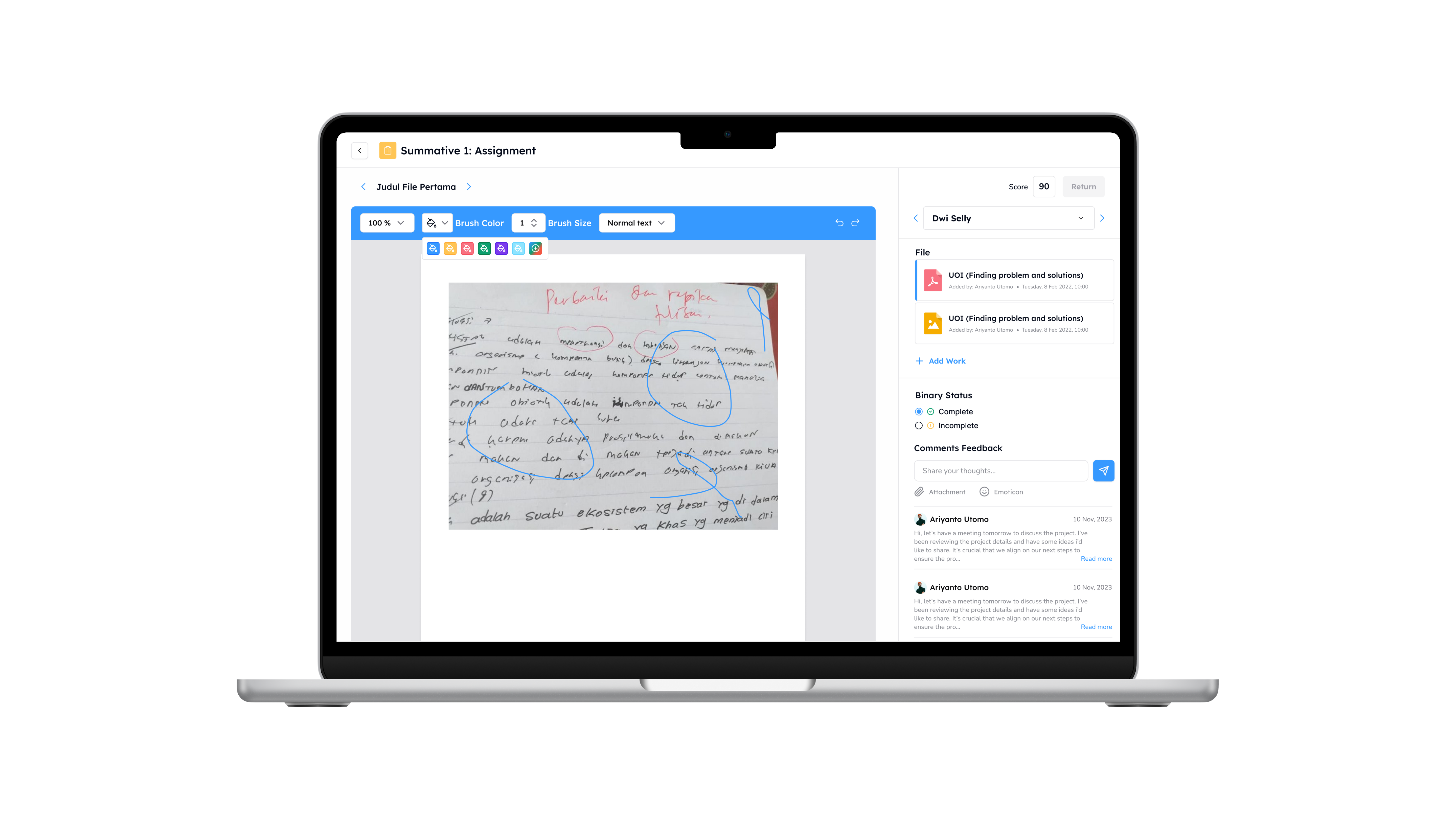
With this feature, everything comes together. Teachers can open student assignments directly in Guru Kreator, review and correct the same file, and then assign grades using the assessment tools that best fit the task.
Teachers can annotate files directly—adding notes, highlights, or corrections just like grading on paper, but in a more organized digital format. For simple practice tasks, a binary complete or incomplete status can be given in a single click. For deeper assessment, teachers can use rubrics and add personal comments so students clearly understand their strengths and areas for improvement.
All of this happens in one integrated workspace. Grading no longer feels like a separate administrative chore, but a natural part of the learning process.
More Relevant Feedback for Students
The speed of feedback plays a major role in effective learning. When assignments are returned weeks after submission, students often lose context. Grades become just numbers, not learning tools.
With Grading Students’ Assignments, teachers can shorten that gap. Once grading is completed and the assignment is returned, students receive a notification and can immediately view their results. Teachers’ comments and annotations help students see what they did well and what they need to improve.
Faster feedback brings grading back to its real purpose: meaningfully supporting student learning and growth.
Directly Connected to the Class Gradebook
One of the biggest challenges in assessment is grade recapping. Many teachers still have to retype scores from personal records into the school’s reporting system. This manual process is time-consuming and prone to errors.
In Guru Kreator, every score or status given through Grading Students’ Assignments is automatically recorded in the class Gradebook. Teachers no longer need to manually recap grades at the end of the semester.
This integration helps maintain data accuracy by minimizing the risk of input errors. It also allows homeroom teachers and school admins to monitor student progress in real time through the class ledger—without repeatedly requesting additional reports from teachers.
Neater Grading, More Focus on Students
Grading Students’ Assignments is more than a digital marking tool. It is designed to simplify teachers’ daily work so grading is no longer dominated by exhausting, repetitive tasks.
With a clean, integrated workflow, teachers have more space to focus on what matters most: understanding each student’s development and improving learning experiences over time. Grades are no longer just administrative data, but meaningful insights that support reflection and continuous improvement.
If you’re looking to make student assessment more structured and efficient, Grading Students’ Assignments in Guru Kreator can be a strong first step. Get a free demo today!